Guides
Accepting payments and invoices
At its core, payments start with an outstanding amount to collect from a customer. It is possible to build and maintain all payment logic independently: handling mandates, keeping them up-to-date, storing tokens, generating payment links, keeping track of payment methods and deciding which options to show to which customer. However, this quickly becomes complex and hard to scale.
Instead, this entire responsibility can be delegated to Twikey by submitting outstanding amounts to the invoice endpoint. Despite the name, the invoice endpoint is not limited to traditional invoices - it handles any type of payment: subscription fees, one-time charges, fines, donations, or any other outstanding amount. By submitting a payment to Twikey, Twikey takes care of everything related to payment collection:
- Offering the correct payment methods to the customer
- Converting customers to automatic payment when a mandate is possible
- Managing mandates, tokens, and payment links
- Handling different payment flows based on the customer’s situation
Payment methods and PSP configuration are managed in the Twikey dashboard. When creating a payment, it is not necessary to know whether the customer has a mandate/token, which payment method applies, or whether a mandate/token needs to be signed. This means a single integration covers all payment flows.
Every payment flow starts with a call to our invoice endpoint: POST /creditor/invoice, if you've got a lot of them you can even send them in 1 single call via the batch insert.
From that point on, Twikey determines the appropriate actions based on the customer context, available mandates/tokens, and configuration. The sections below describe the possible flows that can follow, and how to track and handle them via the payment feed.
Payments and invoices on a customer with a mandate/token
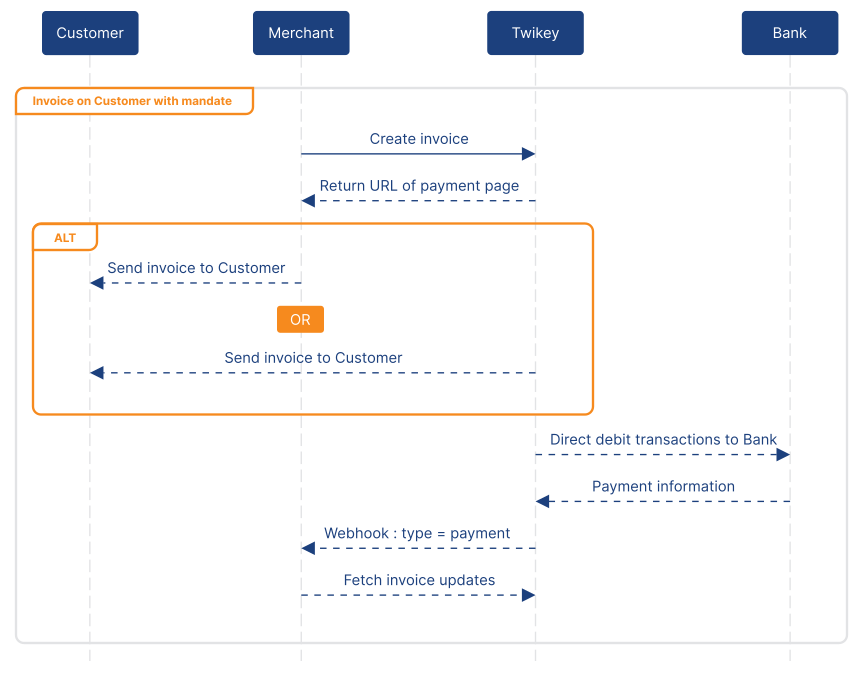
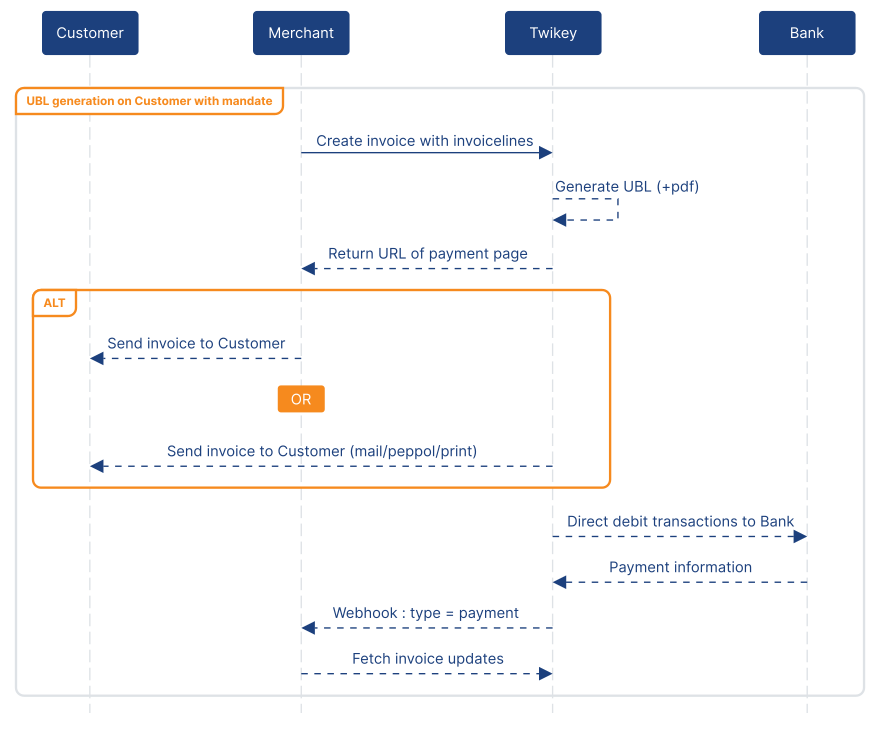
When the customer already has an active mandate/token, the flow is straightforward:
After creating the payment, Twikey will automatically initiate a transaction according to the mandate/token details. No additional customer interaction is required. A webhook is sent when the payment status changes, after which the details can be retrieved via the payment feed.
The payment page will also reflect this state. Available payment methods are hidden and the customer is informed that an automatic payment is already in progress and no further actions are necessary.
Payments and invoices for a customer without a mandate/token
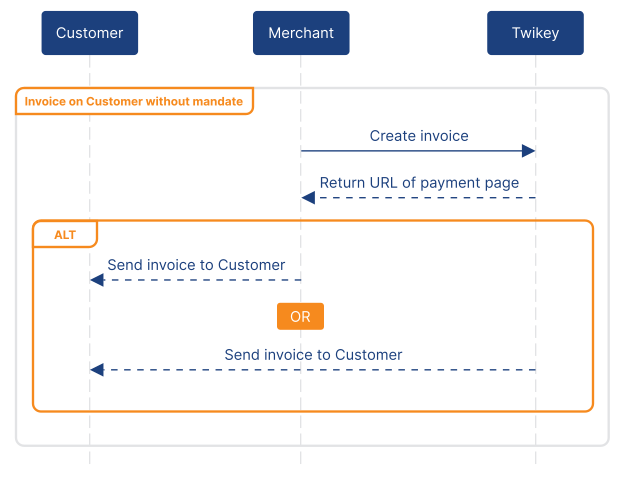
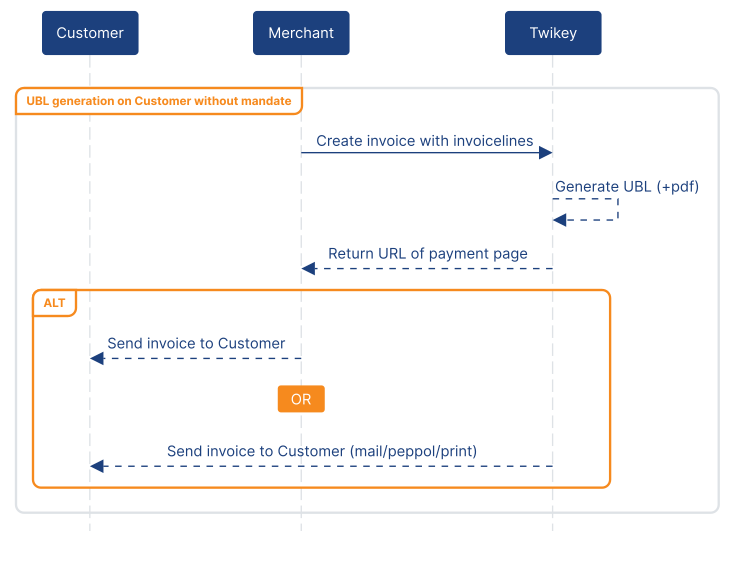
When there isn't a mandate/token to automatically initiate a transaction, the customer will be shown the different enabled payment methods for the payment.
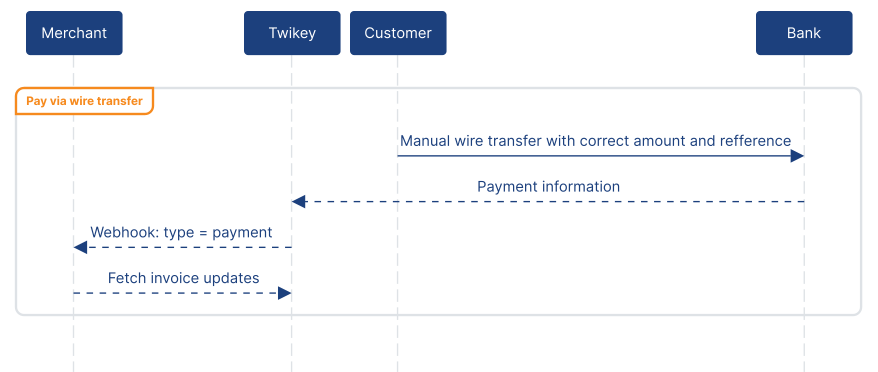
Depending on what payment method is chosen, the flow at Twikey's side will be different but ends with a payment event in the payment feed. Once the customer is finished a webhook is sent.
Available payment methods
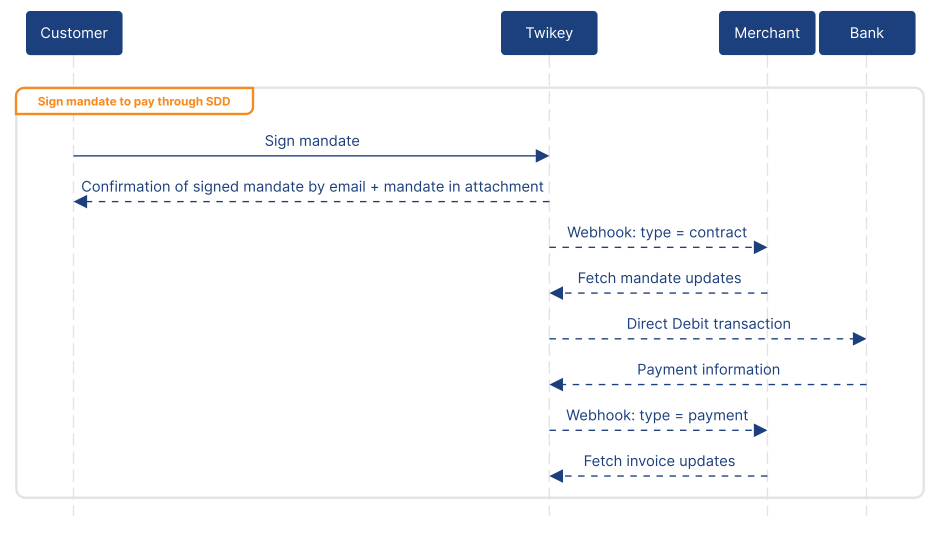
Ideally the customer signs a mandate/token for future payments. This way payments happen automatically reducing late payments.
After the customer has signed, Twikey will automatically initiate the payment on the bank/PSP side.
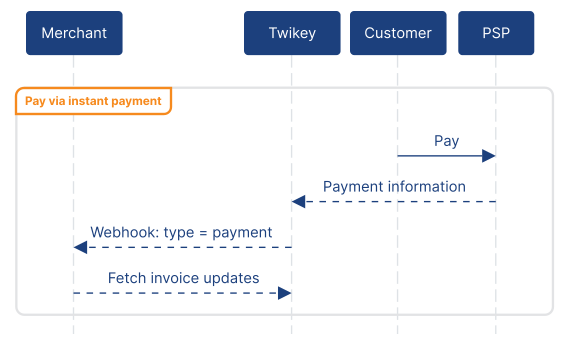
The handling of one-off payments is always the same, regardless what PSP is connected to Twikey.
While not recommended as the primary payment method, wire transfer information can be made available on the payment page. Note that a successful match only occurs if the remittance information and amount are correctly provided by the customer.
Payment feed
Once a payment is created, Twikey becomes the source of truth for everything that happens to that payment.
Instead of querying individual payments, the payment feed should be consumed. This feed is event-based and represents a chronological stream of events describing what has happened to all payments since the last read. This includes all steps, so if a payment was collected via direct debit but has since been reversed, both the payment and payment_failure event will be present in the feed.
Not only are all payment events available, but more in-depth information can be extracted if needed for the integration:
- Which bank or PSP (gateway) was used for payment
- What mandate/token was used
- A unified error code
- The exact codes received from the gateway
- The next automatic follow-up step Twikey will execute
- Where in the automatic follow-up process the payment is
Bulk payments and invoices
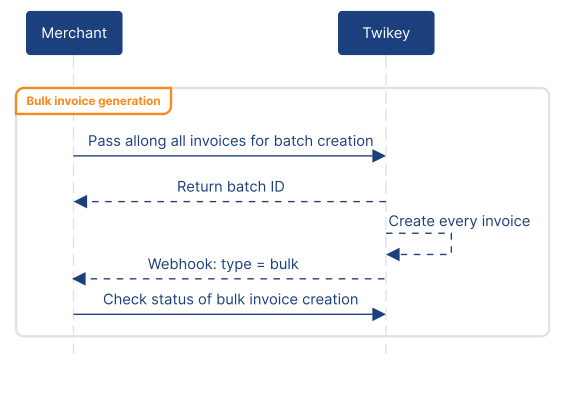
Instead of creating payments one by one, multiple payments can be submitted in bulk. Bulk payments allow delivering multiple outstanding amounts in a single API call, instead of one request per payment. This is especially useful for batch-based billing or periodic exports. After submission to POST /creditor/invoice/bulk, Twikey processes the batch asynchronously. Each payment is handled individually and follows the same payment logic and validation flow as a regular payment request.
Hosting invoice documents When submitting payments in bulk, it is not necessary to upload invoice PDFs.
Instead, the invoice document can be hosted externally, with only the document URL included in the bulk payload. During the bulk job, Twikey will automatically fetch and store the document, so the full PDF does not need to be transmitted in the API call. The copied document is then used consistently across all communication and payment flows related to the payment.
Tracking a bulk job
Once processing is completed, Twikey sends a webhook indicating that the batch import has finished.
At that point, the final status of the bulk job can be retrieved via the bulk status endpoint. This allows verification of:
- Whether all payments were imported successfully
- When to stop hosting invoice PDFs online
Actions on a payment or invoice
Once a payment has been created, Twikey automatically handles initial delivery to the customer and any configured follow-up steps based on the profile's sending configuration. No API call is needed for this initial communication or for the automatic dunning process.
When manual intervention is required outside of the automatic flow, additional actions can be triggered. These actions fall into two clear categories: communication and payment actions. All of these actions use the same endpoint structure: POST /creditor/invoice/{{id}}/{{action}}
Communication actions
Communication actions allow manually (re)sending a notification to the customer, for example to retry a failed delivery or send an additional reminder outside of the automatic follow-up cycle.
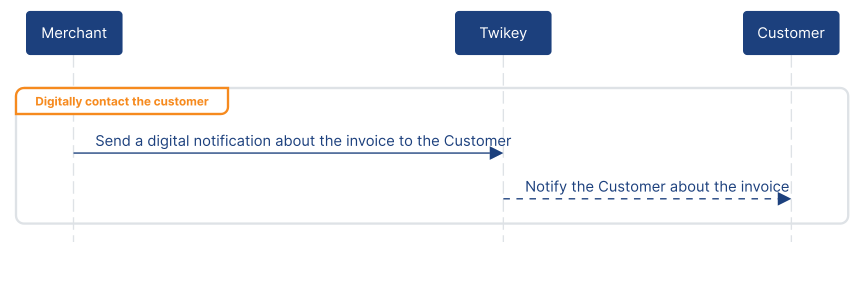
Depending on the situation, the options are:
- Send a reminder by email or SMS
- Send a physical letter via one of our postal partners
- Retry sending the invoice over peppol
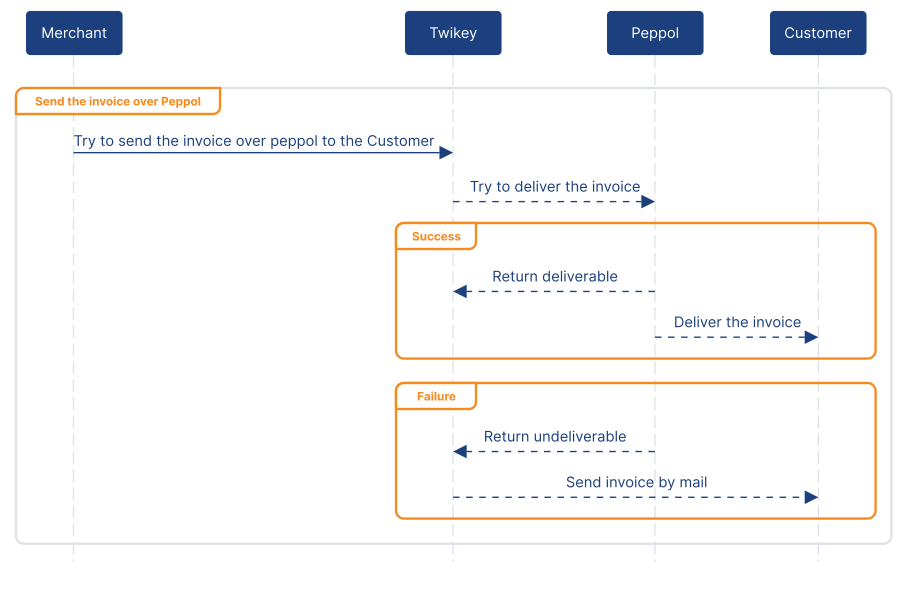
Regardless of the channel, every communication always links back to the original payment page of the invoice. This ensures that:
- The customer always sees the current state of the invoice
- Duplicate payments are avoided
- Payment method availability stays consistent
- No need for generating new payment requests or links
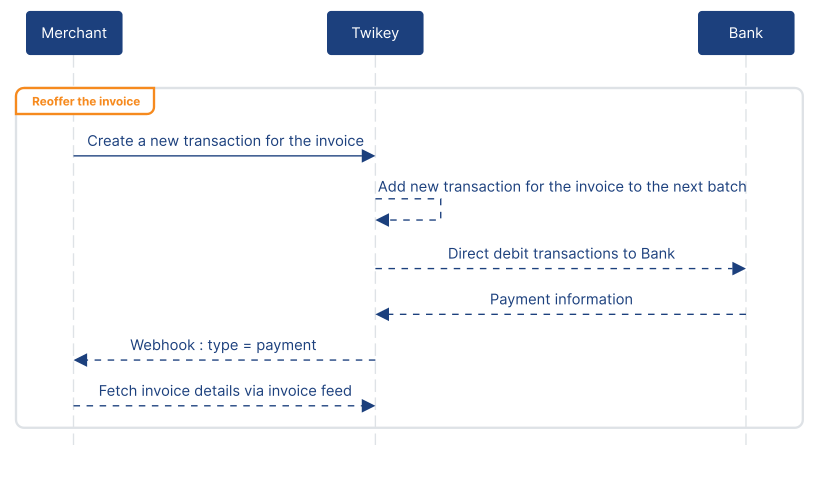
Payment actions When a customer has an existing mandate or token, Twikey automatically attempts collection and runs through the configured dunning steps without any API call needed. Payment actions are only needed when this automatic process has been exhausted and manual intervention is required. They allow intervention on an existing payment without creating a new payment request. There are two possible approaches:
Retry an automatic payment If the customer has an existing mandate or token, Twikey can be instructed to attempt a new automatic payment using that mandate or token.
Start a payment plan
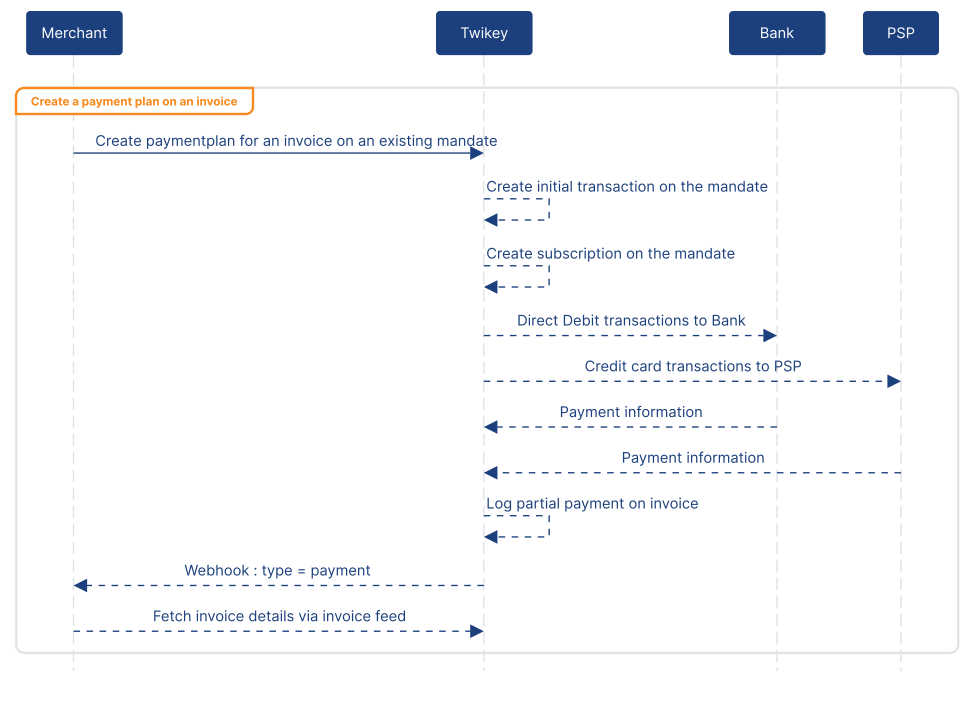
As an alternative, a payment plan can be started. When creating a payment plan, the following is expected:
- The number of instalments
- Which mandate or token will be used
- The initial amount to be collected
- The amount of each subsequent instalment
Twikey then takes care of:
- Scheduling the instalments
- Executing each payment on the mandate or token
- Reporting progress and results through the payment feed
Line items
Line items are only required when Twikey needs to generate a PDF or UBL document, for example for delivery over Peppol. If document generation is not needed, this section can be skipped.
When providing line items, they must be included as part of the invoice data. Twikey applies the strict Peppol rules when handling invoice lines. This ensures that generated UBL documents are valid and can be successfully delivered. These rules are enforced even when invoices are not sent over Peppol, ensuring consistent behavior across all integrations.
If the UBL specification changes in the future, Twikey takes care of those updates internally. As long as the integration follows the line item rules described below, no changes are required. For details about VAT and rounding please refer to our support page which explains in more depth how you can avoid legal issues.
Credit notes vs refunds
Depending on what you are trying to achieve, you should either create a credit note or issue a refund on a payment, or do both, as in Twikey issuing a refund works differently from issuing a credit note.
Refunds
Refunds are used when money needs to be paid back to the customer. When creating a refund, Twikey will automatically use the original payment method and where possible execute the refund on the same mandate, token, or PSP that was used for the payment.
Refunds are purely payment operations. They do not generate accounting documents and do not affect invoice totals or states beyond the monetary reversal.
Credit notes
Credit notes are used to correct or reduce an invoice, regardless of whether money flows back immediately. Typical use cases for credit notes are:
- Generating a credit note as a PDF or UBL (for example for Peppol) and sending this to the customer
- Reducing the amount of an unpaid invoice
Creating a credit note uses the same endpoint and parameters as creating an invoice. The only difference is that the amount is negative. A credit note can be linked to an existing invoice by providing relatedInvoiceNumber in the request body. This means credit notes fit naturally into the existing invoice and payment flows without requiring a separate integration.
Credit note behavior based on invoice state
Depending on the state of the linked invoice, Twikey behaves differently when you create a credit note.
Booked or expired invoices
- The credit note amount is deducted from the invoice
- Partial credit notes reduce the remaining payable amount
- The credit note itself is immediately marked as paid
- Any remaining balance on the invoice can still be collected
- If the total of all linked credit notes reaches the full invoice amount, the invoice is marked as paid
Paid invoices
- The credit note amount is not deducted from the invoice
- The credit note remains in a booked state
- No refund is triggered automatically
- If money needs to be returned in this case, a refund must be created separately
Mandates and tokens
As described in the payments section, when a customer has a mandate or token, invoices are collected automatically without any customer interaction. Customers can also sign mandates directly from the payment page. However, mandate signing and management can also be implemented directly, allowing for finer control or integration into existing processes. When working with transactions directly, managing the mandate is expected.
A mandate is an authorization for Direct Debit collection (SEPA CORE, SEPA B2B, or BACS), while a token represents stored card details for recurring charges. Despite the legal and functional differences between these schemes, Twikey unifies them: they are created and used in the same way. Payment flows, transaction flows, and mandate actions work identically regardless of the underlying type, pulling all schemes in line and simplifying the integration to a single approach.
Every mandate or token starts with one of two endpoints: POST /creditor/invite where Twikey handles the full signing experience, or POST /creditor/sign where the signing process is controlled externally. Once created, all changes to mandates and tokens, including new signatures, amendments, and cancellations, are available through the mandate feed.
The /invite vs /sign endpoint
There are two ways to create a mandate or token, each offering a different level of control over the signing experience.
The invite endpoint
The POST /creditor/invite endpoint creates a prepared (unsigned) mandate and returns a signing URL. When the customer visits this URL, Twikey handles the entire signing experience: validating the customer's information, presenting terms and conditions, and offering the signing methods configured on the template.
The sign endpoint
The POST /creditor/sign endpoint bypasses all Twikey screens. This is intended for integrations where the signing experience is fully embedded in the merchant's application. Since Twikey's screens are not shown, the method to be used is expected along with any method-specific data. For example, a wet signature requires the signature image, and for eMachtiging the BIC is needed so the bank selection screen can be skipped. Twikey's terms and conditions are also to be included in the merchant's own terms, as Twikey's acceptance screens are not presented to the customer. Because of this, links generated at the sign endpoint are meant to be used immediately instead of sending out to the customer.
Importing an existing mandate
Using the sign endpoint with method=import is a special case: it assumes the mandate is already fully signed externally and is simply being imported into Twikey. This is available on every template regardless of the configured signing methods.
When to use each endpoint
The invite endpoint is the simplest integration: Twikey takes care of the signing UX, validation, and terms acceptance. The sign endpoint provides full freedom to build the signing experience into a custom flow, but comes with the responsibility of handling method-specific data, customer data collection and terms acceptance.
Customer signing flows
Independently of which endpoint is used, there are two patterns for how the signing experience is delivered to the customer.
Twikey sends the invite
When Twikey sends the invite, the signing link is delivered by email directly to the customer. This is well suited for post sale conversions to automatic payment or bulk conversion campaigns. The customer receives the email, clicks the link, and completes the signing process.
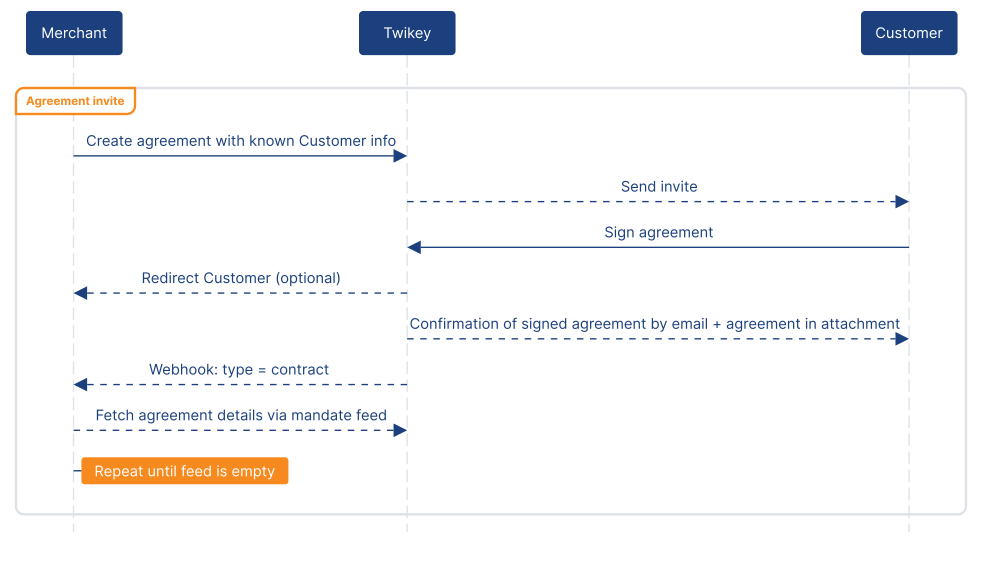
Redirect the customer Instead of having Twikey send the invite, the signing URL is returned in the API response and can be used to redirect the customer directly. This is ideal for built-in onboarding flows in websites or when communications are sent through an external system.
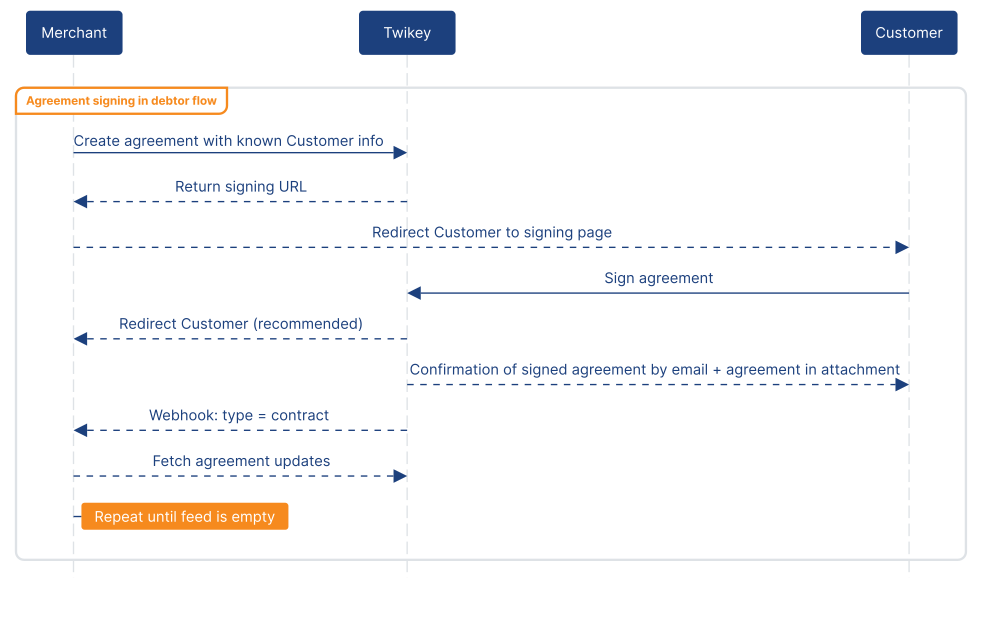
Signing via first payment
In scenarios like checkout flows, subscription activations, or any situation where onboarding and collecting happen simultaneously, signing a mandate can be combined with collecting a first payment in a single step. By including transactionAmount and transactionMessage when creating the mandate, the customer signs and pays in one flow. Since signing via first payment should always be tied to an actual purchase, the validity of the resulting signature is a lot stronger.
However, this requires a signing method that supports initiation via first payment where a real payment is made via a PSP (which captures the IBAN or card details) or via payment initiation (Twikey-pay-by-bank). Since a payment is involved, two webhook events are sent: type=payment for the transaction and type=contract for the signed mandate.
B2B validation
B2B SEPA Direct Debit mandates differ from CORE mandates in that they require not only the customer's signature but also registration at the customer's bank. How this is handled depends on the bank:
Connected banks
For banks where Twikey has a direct connection, the entire signing and registration process is digital and automated. No manual steps are needed. The customer signs the mandate and bank registration is handled in the background.
Non-connected banks
For banks without a direct connection, the B2B validation flow can be activated. After the customer signs the mandate, Twikey takes care of the registration with the bank: reminders are sent if the mandate hasn't been activated yet, and Twikey periodically tests whether the registration has been completed. Once the registration is confirmed, the mandate becomes fully signed and an AcceptedBank event is sent via webhook. If registration is not confirmed after the retries, the mandate remains unsigned.
The B2B validation behavior is configured per profile in the Twikey dashboard.
Mandate feed
Once mandates or tokens are created, Twikey becomes the source of truth for everything that happens to them. Instead of querying individual mandates, all changes are available through the mandate feed.
This mandate feed is state-based: it returns the latest state of each mandate that has changed since the last read. This includes new signed mandates, amendments (such as address or IBAN changes), and cancellations.
For each mandate update, the feed provides details such as signer information, the signing method used, amendment reasons, and cancellation reasons.
The feed is expected to be consumed until no more updates remain, ensuring all changes are processed.
By default, the mandate feed returns all available attributes. To reduce the response to only the needed fields, include parameters can be used. Available options are: mandate, person, signature, plan, tracker, cancelled_mandate, paidamount, and payment.
Each entry in the feed corresponds to one of three message types:
- Signed mandate: the message body starts with
Mndt, containing the full mandate details. - Amendment: the message body starts with
AmdmntRsnobject with aRsnfield describing the reason of the update. - Cancellation: the message starts with
CxlRsnwith aRsnfield describing the cancellation reason.
The state column in the table below reflects the actual mandate states as returned by the mandate details endpoint.
| State | Type | Feed representation |
|---|---|---|
| SIGNED | Collectable | Message starts with Mndt, or AmdmntRsn.Rsn = collectable |
| SUSPENDED | Uncollectable | AmdmntRsn.Rsn = uncollectable|{source} |
| CANCELED | Uncollectable | Message starts with CxlRsn |
| REFUSED_BY_DEBTOR_BANK | Uncollectable | Message starts with CxlRsn (same structure as canceled) |
| PREPARED | Pending | Not returned in the feed, as the mandate is pending at the moment of creation |
| SIGNED_PENDING_DEBTOR_BANK | Pending | Not returned in the feed (pending-to-pending transition) |
| REQUIRES_MORE_SIGNATURES | Pending | Not returned in the feed (pending-to-pending transition) |
| Pending | Not returned in the feed (pending-to-pending transition) | |
| PENDING_MERCHANT_APPROVAL | Pending | Not returned in the feed (pending-to-pending transition) |
Intermediary states
Unlike the payment feed, which is event-based and includes all intermediate events, the mandate feed only reflects the current state. If a mandate went through multiple state changes between two feed reads, only the final state is returned.
To capture all intermediate states, the webhook (type=contract) can be used to be notified immediately when any update occurs. By fetching the feed right away after receiving a webhook, each state can be logged before it changes again.
Returned agreement types
By default, the feed returns CORE and B2B mandates. To include other types such as credit card tokens, the X-TYPES header can be used to specify which types to include.
Actions on a mandate
Once a mandate or token has been created, there are additional actions available through the POST /creditor/mandate/{mndtId}/action endpoint. These actions fall into three categories.
Communication actions
These actions are used to guide unsigned mandates toward completion.
- method = invite: re-send the signing invite by email
- method = reminder: send a reminder to the customer to sign the mandate
Customer self-service
For signed mandates, the customer can be given access to manage their own mandate details.
- method = access: provides a link to the customer portal for the specific mandate. Through the portal, the customer can update their IBAN, modify updateable attributes, and manage their mandate details.
B2B validation overrides
For B2B mandates, the validation behavior configured on the profile can be overridden on a per-mandate basis.
- method = automaticCheck: toggle automatic validation on for this specific mandate, overriding the profile default
- method = manualCheck: toggle automatic validation off for this specific mandate, overriding the profile default
Mandate lifecycle
Updating mandate details
Once a mandate is signed, details such as address, IBAN, mobile number, email, company name, language, and any custom attributes defined on the template can be updated via POST /creditor/mandate/update. Updates to a mandate are reflected in the mandate feed.
Canceling mandates
Mandates can be canceled through DELETE /creditor/mandate. Even when a cancellation is received outside Twikey, it is recommended to communicate it back so all systems can remain in sync.
Automatic cleanup of unsigned mandates
Unsigned mandates or tokens expire automatically after 12 months, or after 6 months once the signing link has been opened. If a new mandate is created on the same profile for the same customer and the new mandate is signed, any older unsigned mandates for that customer are automatically removed, keeping the environment clean of lingering unsigned mandates and tokens.
Payment links
Payment links are meant for one-off payments without a mandate or token and can be created via POST /creditor/payment/link.
Where the invoice endpoint acts as a "send and forget" implementation that handles the method selection, follow-up, mandate conversion, and communication, payment links leave that control to the integration.
Payment links redirect the customer straight to the PSP, bypassing the Twikey payment page entirely.
If the payment method selection screen on the PSP's side also needs to be skipped, this can be done by including the method parameter in the create call.
This makes payment links the right choice when a custom checkout, landing page, or communication flow already exists and the automatic orchestration of the invoice endpoint is not needed.
Customer payment flows
Independently of how the payment link is created, there are two patterns for delivering the payment link to the customer.
Twikey sends the invite
When an email is provided and sendInvite is set, Twikey delivers the payment link directly to the customer. This is well suited for standalone payment requests where no additional landing page or communication flow is needed. 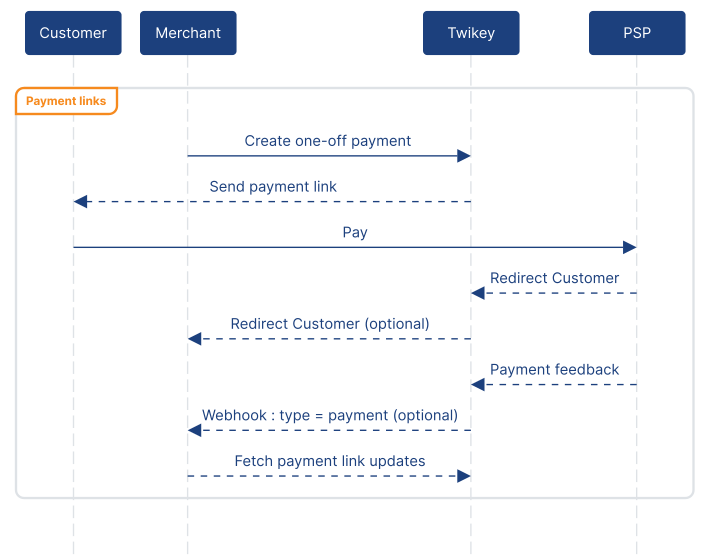
Redirect the customer
Instead of having Twikey send the invite, the payment link URL is returned in the API response and can be embedded in custom flows, communications, or pages. This is ideal for checkout flows in websites or when communications are handled by an external system.
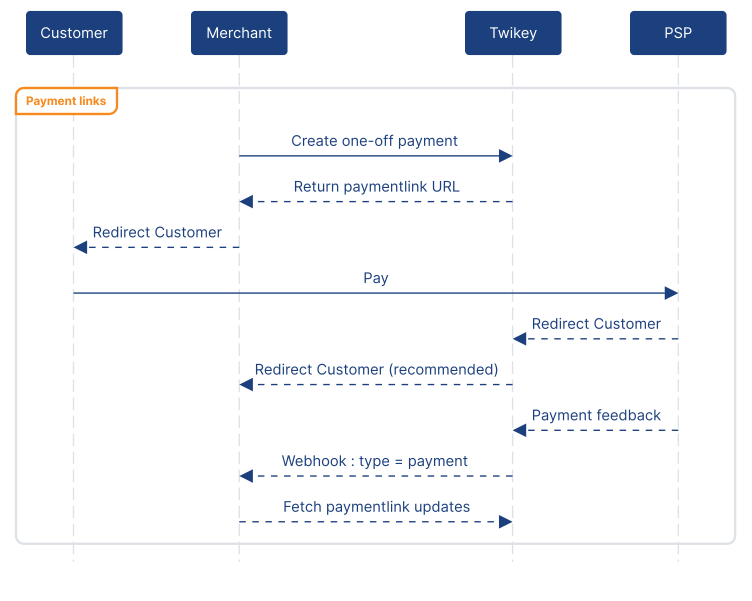
Linking a payment link to an existing payment
A payment link can be linked to one or more existing unpaid transactions by passing txref when creating the link.
Once the payment link is paid, all linked transactions are marked as paid as well. This is useful for consolidating multiple outstanding amounts into a single payment action during a custom follow-up of unpaid transactions.
It is also possible to create a payment link on an existing invoice by providing the invoice parameter with the invoice number. This allows collecting payment for an existing invoice directly via the PSP rather than through the Twikey-hosted payment page used by the invoice endpoint.
Payment link feed
The payment link feed works on the same state-based model as the mandate feed: each call to GET /creditor/payment/link/feed returns entries that have changed since the last retrieval. Each entry represents the current state of a payment link, not an individual event.
By default, only paid updates are returned. Passing all=true includes all state changes.
Additional detail can be included by adding include parameters: customer, meta, time, and refunds. These are not included by default to keep the response compact.
Validating payment link webhooks
For checkout integrations, it is important to verify that a webhook genuinely originates from Twikey. Validating the webhook can be done by validating the x-signature header. This is the same validation mechanism used for all Twikey webhooks.
See the webhook reference for full details.
Refunding a payment link
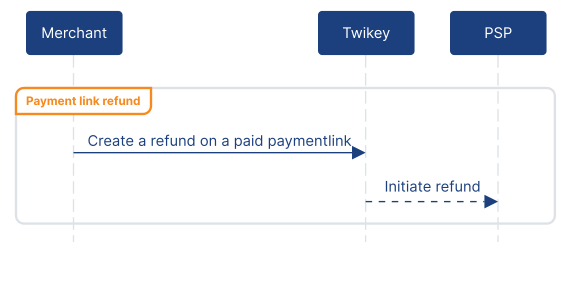
A paid payment link can be refunded fully or partially via POST /creditor/payment/link/{id}/refund. Refund support depends on the PSP that has been activated in the Twikey portal. The refund state is reflected in the payment link feed when the appropriate include is also added.
Transactions
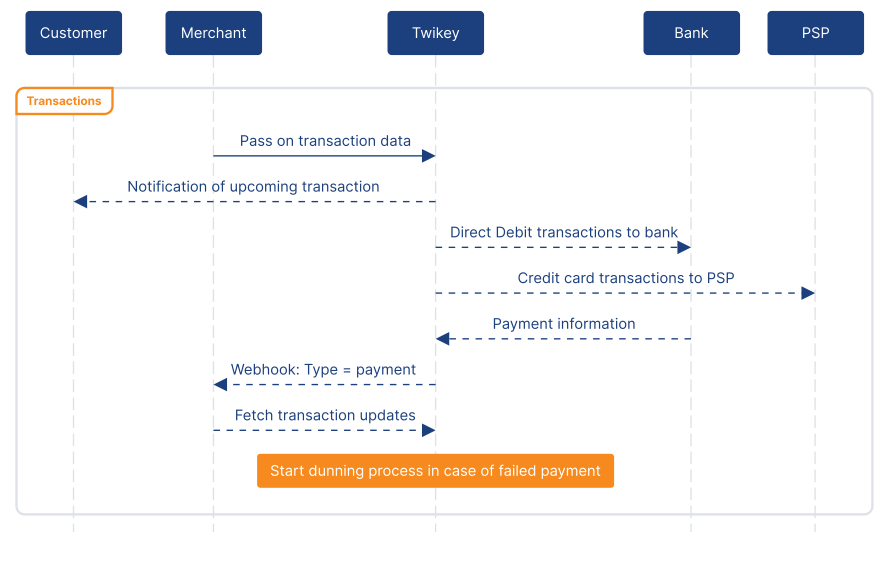
Unlike the payments flow where invoices are managed and collected automatically, transactions operate directly on mandates or tokens. A transaction is always created on a specific mandate, not on a customer. Because of this, mapping transactions to the correct mandate or token is handled by the integration, not by Twikey.
As with mandates and payment links, working with transactions directly offers finer control over the collection process, but also comes with more responsibility in managing the flow correctly.
Transactions are created via POST /creditor/transaction, passing the mandate reference, amount, and a message (shown on the customer's bank statement). Twikey collects pending transactions into batches and submits them to the bank or PSP for processing.Once feedback is received, a type=payment webhook is sent and the results can be retrieved through the transaction feed. When a transaction fails, the configured dunning process starts automatically.
Transaction feed
The transaction feed works on the same state-based model as the mandate feed: each call to GET /creditor/transaction returns the current state of every transaction that has changed since the last retrieval. Each call advances the position, so the feed is expected to be consumed until empty. To record all intermediate states, the payment webhook (type=payment) can be used to trigger a feed fetch as soon as any change occurs.
The final flag
Each entry also includes a final flag:
final=trueindicates that no more automatic actions will be performed on this transaction. This applies to transactions that are paid and settled, or where all automatic follow-up steps have been exhausted after the transaction failed.final=falseindicates that Twikey is still performing automatic follow-up and further state changes are expected.
Note: PAID + final=true transaction can still be reversed by the bank at a later point (e.g. a chargeback or reversal).
In practice, a direct debit transaction will almost always first come back as PAID + final=true, as this is how banks communicate about direct debits: the whole batch is marked as paid, and on subsequent days the bank communicates about individual unpaid transactions.
Automatic follow-up
When a transaction fails, Twikey performs automatic follow-up steps such as re-offering the payment, sending notifications to the customer, and proposing alternative payment methods. The feed reflects the outcome of these steps as they complete. A transaction may transition from ERROR back to PAID if a follow-up step succeeds, or remain in ERROR with final=true once all steps have been exhausted.
Include parameters
By default, the feed returns a compact response. Additional detail can be retrieved by adding include parameters:
collection- the collection batch IDlastupdate- timestamp of the most recent state changeaction- all automatic follow-up actions taken in case of a failed transactionaction_payment- likeactionbut only includes the actions taken since the last time the feed was calledlink- a payment link for the customerstage- the current stage of the transactionseq- the sequence number within the feed
Bulk transactions
Instead of creating transactions one by one, up to 5,000 transactions can be submitted in a single request via POST /creditor/transaction/bulk. After submission, Twikey processes the batch asynchronously. A type=bulk webhook is sent once processing is complete, and the batch status can be checked using the returned batch ID.
Refunding a transaction
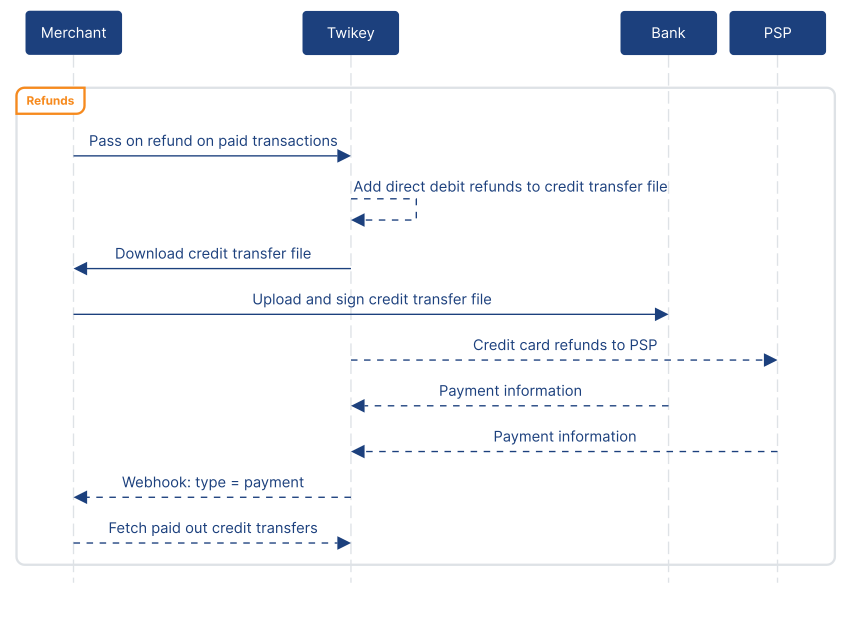
A refund can be initiated on any paid transaction via POST /creditor/transaction/{id}/refund. How the refund is processed depends on how the original transaction was collected.
For direct debit transactions, the refund is added to a credit transfer file. This file needs to be downloaded, uploaded to the bank, and signed before the refund is executed. The amount is refunded to the IBAN on the original mandate by default.
For transactions collected through a PSP, whether direct debit via a PSP or recurring credit card, Twikey forwards the refund directly to the PSP for processing.
More guides
The following guides are being prepared:
- Subscriptions
- Credit transfers
- Reservations
- Customer identification
- IBAN-name checks
- Collections
In the meantime, the API reference covers all available endpoints.