Sample use cases
Improving your digital invoice pages with Twikey
In many billing flows, you most likely already operate within an established invoicing framework. This may include an existing invoice detail page, customer portal, or ERP-driven billing experience that customers are already familiar with. In such scenarios, introducing a separate, fully fledged payment page purely to accommodate additional payment methods often adds unnecessary complexity, both technically and from a user experience perspective.
Twikey is designed to integrate seamlessly into these existing flows. Instead of forcing a complete replacement of your current invoice landing page, Twikey allows you to embed and orchestrate individual payment capabilities on demand. This makes it possible to extend your current invoice experience with support for automatic payments (such as direct debit or recurring card payments) as well as one-off transactions, while keeping the customer within your own interface as much as possible.
The sections below describe a common use case where a customer receives an invoice, accesses an existing invoice page, and is offered the option to activate automatic payments using Twikey or facilitate a one-off payment. The sequence diagrams illustrate how this interaction is reflected at API level.
The automatic payment
When a customer decides to enable automatic payments, either via direct debit or recurring credit card, a new agreement must be created in Twikey. Requesting the creation of this agreement generates a signing URL, to which the customer can be redirected from your invoice page or customer portal. The customer completes the signing process using Twikey’s hosted signing mechanisms, which are tailored to the selected payment method and comply with the applicable payment scheme and regulatory requirements.
After the signing flow completes, Twikey redirects the customer back to a return URL that reflects the outcome of the signature. This allows you to guide the customer back to a confirmation page, the original invoice view, or a general account overview. A webhook notifies your system when the signing completes, so you can update the invoice status accordingly.
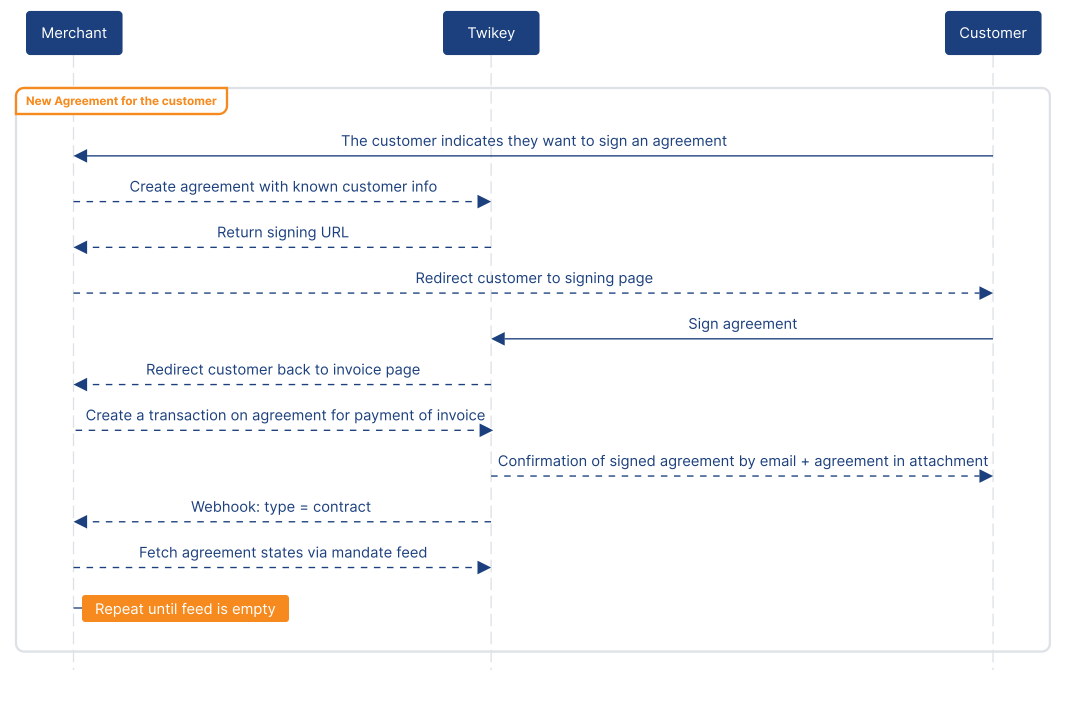
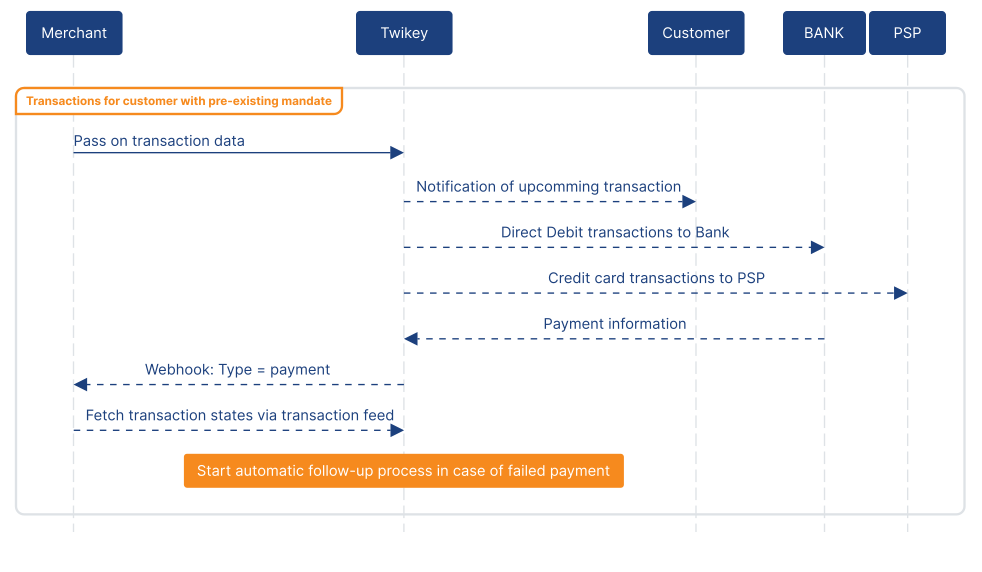
Once an agreement has been successfully signed, it can be used to collect any outstanding or future invoices for that customer. Your system remains in control of which invoices are eligible for collection and when they should be collected. All you need to initiate the collection is the agreement ID, the amount and the message to your customer.
If a payment fails or is rejected, Twikey automatically continues the collection process according to your dunning scheme, which can be configured in the Twikey dashboard. Throughout this process, the current state of the transaction is exposed via the transaction feed, allowing your systems to stay in sync.
The one-off payment
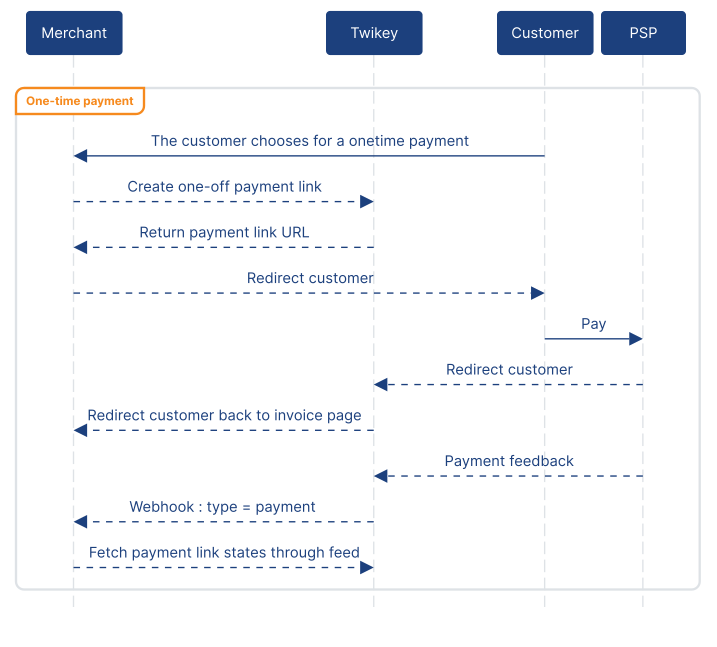
Besides automatic payments, you can also support immediate, one-off payments by generating a payment link through Twikey. This allows customers to settle an invoice directly without creating an agreement, while keeping your integration decoupled from the underlying PSP and allowing PSP changes without impacting your API or business flow.
From an implementation perspective, your system requests a payment link via the Twikey API and redirects the customer to the hosted payment page. Once the payment is completed, canceled, or fails, Twikey redirects the customer back to a return URL you control, such as a confirmation page, the original invoice view, or a general account overview, based on the outcome. A webhook notifies your system of the payment result, so you can update the invoice status in real time.
More use cases
Additional use cases are being developed. In the meantime, the API reference covers all available endpoints, and the guides walk through each product area in detail.